Tax
Tax - Deductibles
Use the 'Tax - Deductibles' Transaction Code to process expenses incurred by the employee, outside the payroll, that are tax-deductible. Examples include payment of trade and professional subscriptions, purchases of tools, and other expenses incurred in order to earn the income that is now being subjected to PAYE.
To create a 'Tax - Deductibles' Transaction Code
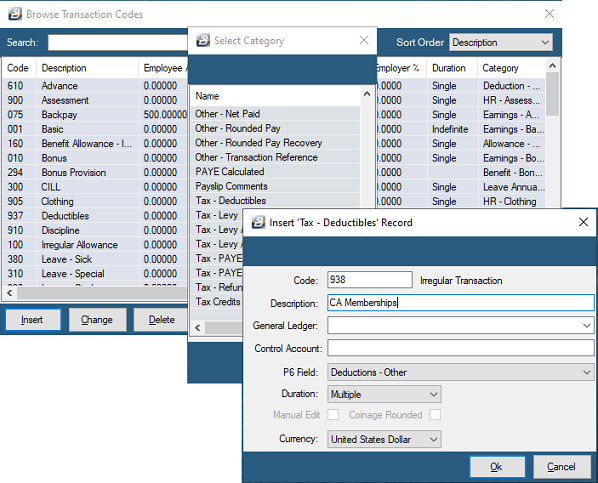
- Go to the 'Edit', 'Transaction Codes' menu options.
- Click 'Insert' and select the Transaction Category 'Tax - Deductibles'.
- Accept/Change the default 'Code'.
- Enter an appropriate 'Description'.
- Select the 'General Ledger' Codes to be entered onto journal reports and exports for the Employee and Employer.
- Set the 'P6 Field' for year-end ITF16 export.
- Set the 'Duration' — whether the transaction is to come through for a 'Single', 'Multiple', or 'Indefinite' number of periods.
- Click 'Ok' to save the new Transaction Code.
Tax Deductible - Donations and Contributions
The following Donations and Contributions are legally tax-deductible according to ZIMRA provisions:
| Description | Section | Limit Per Annum |
|---|---|---|
| Donations to National Scholarship Fund, National Bursary Fund and charitable trusts | 15(2)(r) | None |
| Contribution for equipment, construction, extension, maintenance of hospitals and procurement of drugs and equipment | 15(2)(r1) | US$100,000 |
| Contributions to a research institution | 15(2)(r2) | US$100,000 |
| Contribution for equipment, construction/extension, and maintenance of schools and procurement of books | 15(2)(r3) | US$100,000 |
| Donations to the Public Private Partnership Fund | 15(2)(r4) | US$50,000 |
| Donations to the Destitute Homeless Persons Rehabilitation Fund | 15(2)(r5) | US$50,000 |
| Expenditure on attending Convention or Trade Mission | 15(2)w(i) | Amount incurred for attending not more than one convention/mission in any one year, limited to US$2,500 |
| Contribution to the maintenance of buildings, roads, bridges, sanitation works, water works, public parks, or any other infrastructure approved by the Min of local government | Sect 15(2)(kk) | US$50,000 |
Tax - Levy
Use the 'Tax - Levy' Transaction Code to process additional Tax Levy amounts against employees.
To create a 'Tax - Levy' Transaction Code
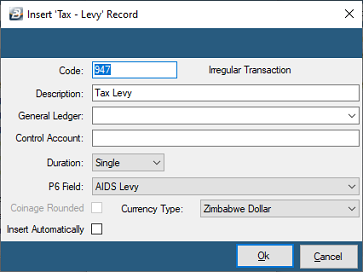
- Go to the 'Edit', 'Transaction Codes' menu options.
- Click 'Insert' and select the Transaction Category 'Tax - Levy'.
- Accept/Change the default 'Code'.
- Enter an appropriate 'Description'.
- Select the 'General Ledger' Codes to be entered onto journal reports and exports for the Employee and Employer.
- Set the 'Duration' — whether the transaction is to come through for a 'Single', 'Multiple', or 'Indefinite' number of periods.
- Set the 'P6 Field' for year-end ITF16 export.
- Select whether the Transaction Code should be inserted automatically onto every payslip on the payroll.
- Click 'Ok' to save.
- Dependencies: Once saved, you can set this up so the processed amount is based on a percentage, amount, or number of units stated in other transactions.
Tax Credit
This Transaction Code is a system-generated transaction. No User setup is required—it is automatically generated and entered when the Calculation Routine is run. The value of tax credits to be applied in the current period comes through onto the payslip for easy identification and checking.
PAYE Calculated
This Transaction Code is a system-generated transaction. No User setup is required—it is automatically generated and entered when the Calculation Routine is run. The value of the PAYE amount in the current period comes through onto the payslip for easy identification and checking in conjunction with the FDS Display.
Was this page helpful?