Currency & Coinage
Belina supports multi-currency payrolls. The base currency is set when creating the payroll. Additional currencies can be added, and exchange rates maintained, for USD/ZiG mixed payrolls or cross-border operations.
Viewing and Adding Currencies
- Go to Setup → Currency

The base currency set when the payroll was created appears automatically.
- To add a second currency, click Insert
- Select the currency and enter the exchange rate
- Click OK
Exchange Rates
Exchange rates convert amounts between currencies when running reports and journals. Rates must be updated regularly to reflect current market or RBZ rates.
To update an exchange rate:
- Go to Setup → Currency
- Select the currency
- Click Change

- Enter the new rate
- Click OK
Best practice: Update exchange rates before running the Calculation Routine each period.
Multi-Currency Payroll
If your payroll pays employees in both USD and ZiG (or multiple currencies), see:
For creating a separate multi-currency payroll, see Creating a New Payroll.
Coinage
The Coinage feature calculates the exact denominations of notes and coins needed to prepare cash pay packets for each employee. This is used for payrolls where employees are paid in cash.
Setting Up Coinage Denominations
- Go to Setup → Global Defaults → Processing
- To set up the available denominations for your currency click Insert
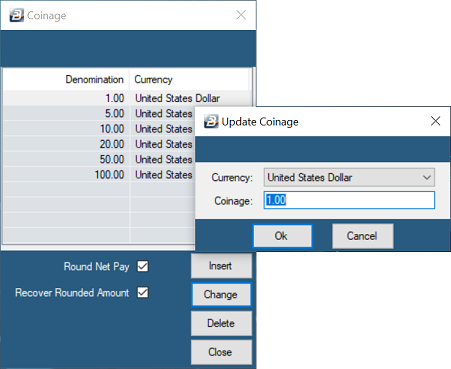
- Tick 'Round Net Pay' if rounding up to the lowest denomination is required. The system will now advance each employee an amount that will bring the Net Pay up to the lowest available coinage denomination on the Coinage Table.
- Tick 'Recover Rounded Amount' if the rounded amounts are to be recovered in the next period.
Was this page helpful?