Reports Overview
Belina Payroll has a wide range of reports. Some should be printed and reviewed for checking purposes; others need to be printed and filed, or saved electronically, to satisfy the legal obligation to keep payroll records for 7 years, or for internal or third-party reference.
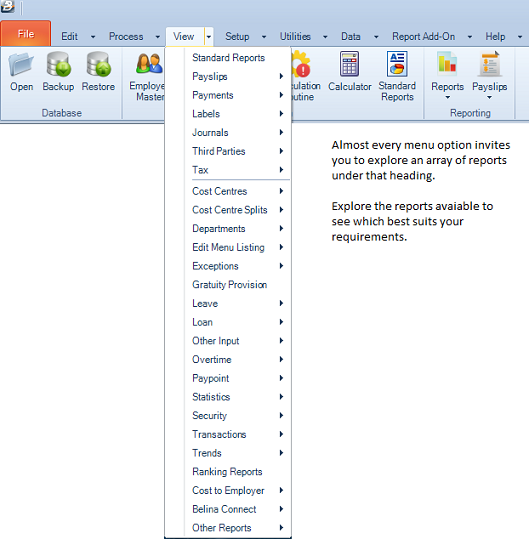
All reports are found under the View menu, grouped under headings such as Payroll, Payslips, Tax, Payments, Leave, Loans, Employee, Statutory, Journals, Exceptions, and Security.
What to Keep on File Every Period
It's essential to run and retain certain reports every period:
- Payslips
- Payroll Detail or Payslip Summary
- Period Journal (confirm it's in balance before filing)
- Third-party reports as required, e.g. NEC, NSSA
- Leave and Loan reports, as necessary
Other reports can be run when needed, even from a subsequent period.
Nowadays, printing paper reports is less common. If you're not printing to paper, keep the electronic PDF instead — ideally with a copy stored on a reliable cloud platform.
Audit reports show changes to employee master fields, transactions processed, and options selected by different users. Belina maintains a full background audit from which these reports can be extracted at any time — see Report Index for the specific Security/Audit reports available.
Report Destinations
Every report can be directed to:
| Destination | Description |
|---|---|
| Preview | View on screen before printing or exporting further |
| Send directly to the printer | |
| Export → Excel | Save as a spreadsheet for further analysis |
| Export → PDF | Save as a PDF document |
| Send via email (used for payslips) |
From the Preview window, reports can also be exported to Word or other formats using the toolbar.
The Range Selection Screen
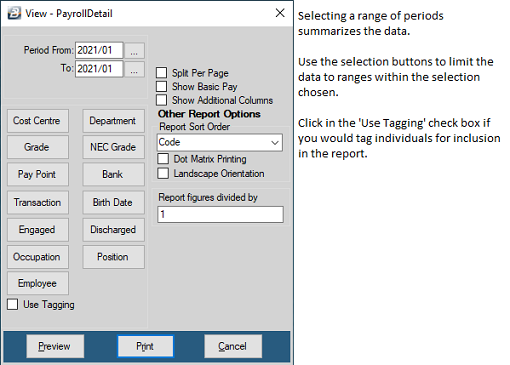
Selecting a report normally opens a Range Selection screen, letting you filter exactly what will be printed:
- Use the buttons on the left to select the employee grouping to reflect on the report — e.g. Department, Cost Centre, Pay Point
- Select Use Tagging to individually select specific employees or groupings from within that selection. The Search facility works together with Sort Order — set the sort order first to help find employees in the order that suits your search
- Use the Report Sort Order dropdown to control the order the report prints in — options differ from report to report. Some options allow grouping by Alpha or Code, useful for grouping transactions by Alpha or Code within each Pay Point, Cost Centre, or Department
- Tick Dot Matrix Printing to move away from the default laser/inkjet formatting, for high-speed dot matrix printers
Range Selection Options by Report Type
Functionality available varies by report. Some of the more common options:
| Option | Applies To | What it Does |
|---|---|---|
| 1, 2, 3 Per Page | Payslips | Number of payslips per A4 sheet (depends on payslip format) |
| Dot Matrix Printing | Most reports | Sends the report without graphical formatting, for dot matrix printers |
| Payslips | Emails payslips using the addresses set up in Employee Master | |
| Employer Contributions | Payslips | Includes the value of Employer Contributions for certain deductions |
| Group By | Most reports | Classifies the report by a chosen criteria, e.g. department |
| Landscape Orientation | Most reports | Prints/previews horizontally where required |
| Next Pay Date | Payslips | Shows when employees are next getting paid |
| Payslip Date | Payslips | The date employees actually receive payment |
| Period From / To | Most reports | Select the current, prior, or a range of periods — ranges are summarized. Defaults to the current period |
| Preview | All | Generates and displays the report |
| All | Sends the report to the printer | |
| Print Summary on Last Page | Payslips | Prints the payslip summary after the last payslip |
| Report Figures Divided By | Most reports | Divides all figures by a chosen factor, e.g. to show amounts in 000's |
| Report Sort Order | Most reports | Changes the print order according to available options |
| Separate | Most reports | Prints a separate copy of the report for each period in a selected range |
| Show Additional Columns | Some reports | Adds extra data columns |
| Show Basic Pay | Some reports | Adds a Basic Pay column |
| Split per Page | Some reports | Splits data by a chosen criteria |
| Use Tagging | Most reports | Tag individual employees or groupings instead of selecting a range |
| YTD Amounts | Payslips | Includes year-to-date values |
For the full list of available reports and where to find each one, see Report Index.
Was this page helpful?