Medical Aid Export (PSMAS)
Belina Payroll HR allows the export of medical aid data to medical aid providers. Currently, only PSMAS has requested export functionality.
Setting Up PSMAS
Step 1 — Create the Medical Aid Scheme
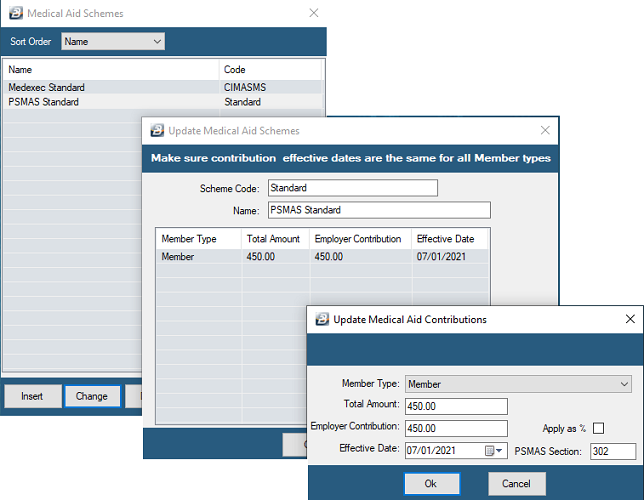
- Go to Edit → Medical Aid Schemes
- Click Insert to add the scheme
- Enter the Scheme Code and Name
- Click Insert to add each Member Type, its contribution rate, Effective Date, and the PSMAS Section number (obtained from PSMAS)
Step 2 — Set Up the PSMAS Transaction Code
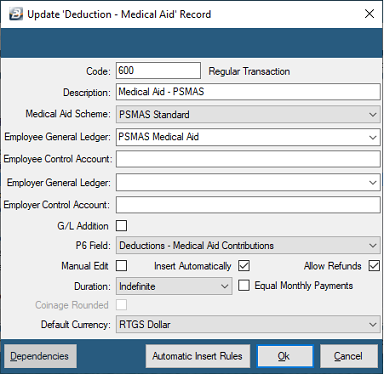
- Go to Edit → Transaction Codes
- Click Insert, select the Deduction - Medical Aid category
- Enter the transaction code details — tick Insert Automatically to have the code placed on the Payslip Input of every employee who has PSMAS set up in their Employee Master record
Step 3 — Capture Employee Members
- Go to the Employee Master record of each employee contributing to PSMAS
- Open the Medical tab
- Click Insert and capture each contributing family member — the employee, spouse, children, and dependants
Exporting PSMAS Data
- Go to Utilities → Exports → Medical → PSMAS
- Enter the details below
| Field | Description |
|---|---|
| PSMAS Transfer Date | The date this return is due |
| Serial Number | Serial number obtained from PSMAS |
| Payee Code | Payee code obtained from PSMAS |
| Destination | Folder for the export file |
| Comment | Any comment to help identify the file's contents — e.g. a date or payroll name |
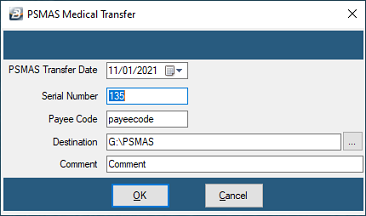
These details are retained for the next time the export is run.
Was this page helpful?