NEC Contributions Export
Two types of NEC export are currently supported.
NEC General
- Go to Utilities → Exports → NEC Contributions → General
- Enter the details below
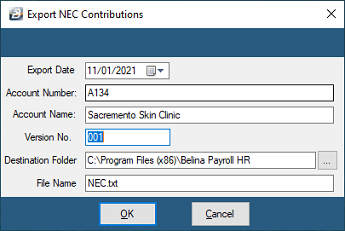
| Field | Description |
|---|---|
| Export Date | The date this return is due |
| Account Number | Your organization's NEC account number |
| Account Name | Your organization name as recorded in NEC's books |
| Version No. | The version number |
| Destination Folder | Folder for the export file |
| File Name | Defaults to NEC.txt — a text file that can be opened in Notepad or word processing software |
These details are retained for the next time the export is run.
NEC Catering
- Go to Utilities → Exports → NEC Contributions → NEC Catering
- Enter the details below
| Field | Description |
|---|---|
| Export Date | The date this return is due |
| Establishment Number | Your organization's NEC account number |
| Employer Name | Your organization name as recorded in NEC's books |
| Employer Class | The NEC Catering employer class |
| Destination Folder | Folder for the export file |
| File Name | Defaults to NEC.csv — a comma-separated file that can be opened in Excel |
Was this page helpful?