General Ledger
Journals can be exported from Belina Payroll and then imported into your accounting software. Currently there are links to Amzim, AccPac, Baan, Impact, Mims, Na Vision, Pastel, SAP, Smart Vision and Sun Accounting softwares, and more. Other links can be made available to you on request. Transferring journal information is useful, especially if cost centre processing is being done.
Set up the general ledger account codes and apply these to the Transaction Codes. The journals will then show the Transaction Codes together with the general ledger code.
Setting Up General Ledger Codes
View written instructions
To enter a General Ledger Code one at a time:
- Go to the Edit - General Ledger menu options
- From the table of current General Ledger Codes press 'Insert'.
- Then enter General Ledger Code details.
- Press OK to save the General Ledger Code.
- Repeat this process for each of the General Ledger Codes.
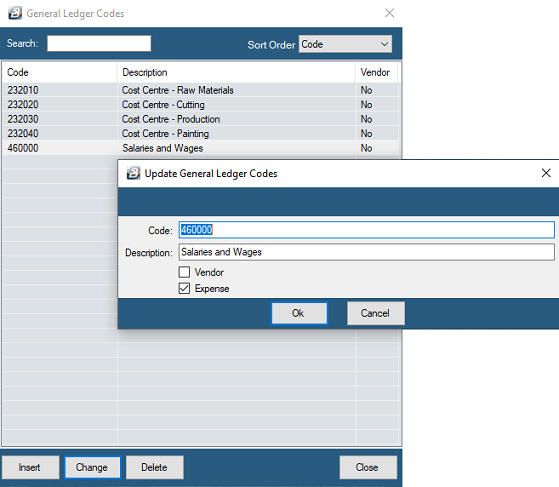
Note: If you intend to export journals from Belina PayrollHR to your accounting software ensure that the 'Code' has exactly the same layout as that found in your accounting software. Example 4250/005 should be entered into Belina with the slash).
Cost Centre or Departmental General Ledger Codes
In the section, above, the value of transactions posted against a Transaction Code would go to one General Ledger Code. This may not be appropriate in Cost Centre processing where the value of transactions for one cost centre should be posted to a specific General Ledger account for that cost centre.
To setup Cost Centre or Departmental General Ledger Codes for specific Transaction Codes:
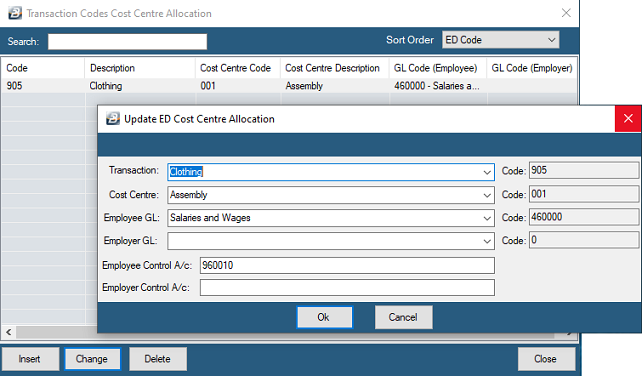
- Go to Edit - General Ledger - Cost Centre (or 'Department') menu options
- to set up the general ledger codes that apply for specified Transactions within cost centres (or Department).
- Notice that default values come through for the Transaction Code.
- These need to be adjusted by using the 'Change' button
- Select the correct General Ledger code for the Transaction Code and Cost Centre (or Department) concerned.
Was this page helpful?