Transaction Codes Overview
Transaction codes are the building blocks of the payroll. Every earning and deduction on an employee's payslip is driven by a transaction code. Setting them up correctly is one of the most important steps in configuring Belina Payroll.
What Is a Transaction Code?
A transaction code defines:
- What the earning or deduction is (e.g. Basic Pay, Overtime, Pension, NSSA)
- How it is calculated (fixed amount, percentage, formula)
- Which general ledger account it posts to
- Which TaRMS field it maps to for tax returns
- How many periods it applies for (single, multiple, or indefinite)
Transaction Categories
Use the Transaction Categories below, to set up Transaction Codes for processing a transactions in a specific way. These are grouped as follows:
Default Transaction Codes
New payrolls are created with a list of default Transaction Codes that assist you get started. Make sure that each one of them are set-up correctly for your requirements.
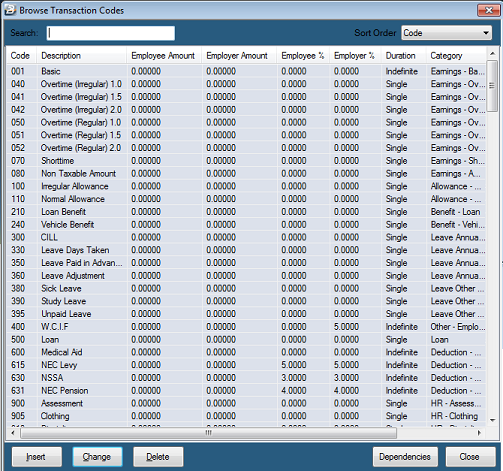

Allowances
Allowances are taxable amounts paid to employees to supplement their income or offset specific expenses.
- Benefit Allowances (Regular/Irregular): Paid to counter the tax impact of receiving a benefit, ensuring the employee's net pay remains the same.
- Normal Allowances: Standard taxable amounts paid on a regular or irregular/once-off basis.
- Service & Shift Allowances: Allowances calculated based on an employee's years of service or the number of shifts they have worked.
- Vehicle Allowances: A standard taxable amount paid regularly for vehicle use.
Benefits
Benefits represent the value of non-cash perks provided to employees.
- Taxable Benefits: Covers the taxable value of Housing, Loans, Vehicles, or other regular/irregular perks, which are added directly to the tax computation.
- Provisions (Bonus/Gratuity): Used to accrue the cost of year-end bonuses or end-of-contract gratuities gradually throughout the year without affecting the employee's current earnings or net pay.
Deductions/Deductibles
Amounts subtracted from an employee's pay or expenses that qualify for tax relief.
- Statutory & Standard Deductions: Includes contributions to Pensions, NEC, Trade Unions, Medical Aid, and general deduction amounts.
- Retirement Annuities: Amounts paid by the employee outside of payroll that are processed here to reduce taxable income before PAYE calculation.
- Savings: Deductions taken from net pay and held in a savings balance for the employee to draw upon later.
Earnings
The primary income components that make up an employee's gross pay.
- Standard Earnings: Includes Basic Pay (hourly, daily, or period rate), regular and irregular Overtime, and Non-taxable amounts.
- Lump Sums & Irregular Pay: Covers Bonuses, Gratuities, Retrenchment packages, and Deferred pay (lump sums spread over multiple periods).
- Shorttime: A deduction from basic pay based on hours not worked (applied after reducing overtime).
Leave
Manages all financial and administrative tracking related to employee time off.
- Annual Leave: Handles adjusting balances, cashing in leave (CILL), taking days off, and paying leave in advance.
- Leave Pay Recovery: Recovers leave paid in advance during the periods the employee is actually away.
- Other Leave Types: Covers a wide variety of specific absences, including Maternity, Sick, Compassionate, Study, Unpaid, and custom/regional types (e.g., Mother's Day, Climatic, Sabbatical).
Loan
Manages the recovery of loans extended to employees.
- Loan Recovery: Processes repayments for loans given outside of payroll, tracking balances, interest, and repayment terms.
- Loan Adjustment: Allows for manual changes to the loan balance or corrections based on outside payments.
Netpay Adjustment
Used to balance out payslips during special processing runs.
- Net Pay Adjustment: Brings the employee's "Net Paid" amount to zero, which allows administrators to process new transactions and generate a second payment for the staff member in the same period.
Other
A catch-all category for system recoveries, employer costs, and specialized adjustments.
- Negative Pay & Recovery: If deductions exceed income, the system advances money to bring net pay to zero, which is then recovered in subsequent periods.
- Rounding: Rounds pay up to the lowest coinage denomination and handles the recovery of that rounding in the next period.
- Expenses & Mileage: Processes mileage claims and medical expenses.
- System Codes: Includes "Net Paid" (the final amount received) and "Transaction Reference" (values used for background calculations that don't directly appear on the payslip).
Tax
Handles all statutory taxation calculations, levies, and adjustments.
- Calculations & Levies: Includes standard PAYE calculations, the Aids Levy, and Tax Credits.
- Adjustments: Allows for manual adjustments to PAYE or Levies for both current and previous periods.
- Tax Refunds: Processes tax refunds directly to the employee.
- Deductibles: Tracks tax-deductible expenses incurred outside of payroll.
Payslip Comments
- Payslip Comments: A specific code used to add personalized text or notes to an individual employee's printed or digital payslip.
Common Transaction Code Fields
| Field | Description |
|---|---|
| Code | Unique identifier that determines the printing order on the payslip (Earnings first, then Allowances, Deductions, and Reserved 900+ codes). |
| Description | The name of the transaction that appears on employee payslips and system reports. |
| General Ledger | Maps the transaction to a specific GL code for journal reports and exports (can be set for both employee and employer). |
| GL Addition | Combines employee and employer GL contribution amounts into a single journal entry (e.g., for Medical Aid). |
| P6 Field | Maps the transaction to the correct field on the ITF16 year-end tax return. |
| Default Currency | The currency this specific transaction is paid in (useful for multi-currency payrolls). |
| Duration | Determines how long the code applies: Single (current period only), Multiple (set range of periods), or Indefinite (every period until further notice). |
| Insert Automatically | Tick to automatically add this transaction to every new employee's payslip. (Note: Can be refined to only apply to Permanent employees for Basic and NSSA). |
| Regular Transaction | This is a transaction that is likely to be processed regularly on an employee's payslip and should, therefore, it is included in the projection of income to estimate the total Taxable Income for the year in the FDS tax calculations. This differs from an Irregular Transaction where the amount of the transaction is added to the total of Taxable income for the year to date and not projected as if it were received regularly through the year. |
| Irregular Transaction | This is a transaction that is unlikely to be processed regularly on an employee's payslip and should, therefore, not be included in the projection of income for FDS tax calculations. |
| Manual Edit | Tick to allow the transaction amount to be manually changed during payroll processing. |
| Dependencies | Bases this transaction on a percentage, amount, or unit value of one or more other transaction codes. |
| Apply TCPL Limit | Used for NSSA setups to enable calculation limits in accordance with Statutory Instrument (SI) 169 of 2021. |
| Apply Threshold | Caps percentage-based deductions or employer contributions at a specified maximum limit. |
| Base On | Calculates the transaction based on the employee's Basic Pay (from their masterfile, internal grading, or NEC grade). |
| Coinage Rounded | Rounds the calculated amount to the lowest denomination specified in the system's Coinage Table. |
| Equal Monthly Payments | Divides monthly contributions over the weeks in a period so weekly-paid employees see consistent deductions, balancing out perfectly at month-end. |
| Previous Rate | Calculates overtime or shorttime using the employee's last rate of pay prior to a recent masterfile update. |
| Rate | The multiplier applied to the base rate of pay when processing transactions like overtime or shorttime (e.g., x1, x1.5, x2.0). |
| Unit Type | Determines whether time-based transactions (like overtime or shorttime) are entered as Days, Hours, or a fixed Amount. |
| Reserved Transaction Codes | System-generated codes (usually 900+) used automatically during calculation routines for standard amounts like PAYE (945), Tax Credits (950), and Net Paid (980). |
Was this page helpful?