Medical Aid Schemes
Set up the Medical Aid Society(ies) and the contribution rates for the member, spouse, children and dependents.
View written instructions
Step 1 - Enter the Medical Aid Scheme
- Go to the Edit - Medical Aid menu options.
- Click Insert to add a new scheme.
- When the scheme has been entered, click Insert to add the contribution rates for each type of member
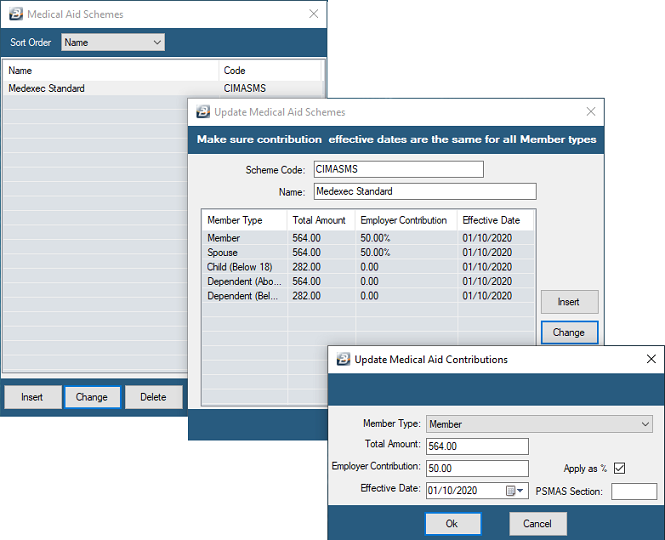
It may be necessary to setup more than one medical aid society. The organization, itself, may have employees contributing to more than one society or individual employees may be contributing on behalf of the immediate family and on behalf of others.
Step 2 - Insert the Medical Aid on Employee Master
To set up the medical aid contributions for an employee, see Employee Master
Step 3 - Process the Medical Aid on the Employee's Payslip
To ensure that the medical aid contribution for an employee deducts on payslip, see Transaction Codes and Payslip Input
Was this page helpful?