Processing Methods Overview
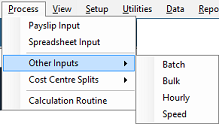
Belina Payroll has a number of different methods of processing data all designed to make it easier for you to process transactions efficiently. Most organizations use 'Payslip Input' with a combination of other methods:
Payslip Input
Process earnings and deductions for each employee in turn. Standing earnings and deductions come through automatically each period. Add, remove, or change any transaction, then continue to the next employee. You can easily view all the transactions being processed against an employee, including the PAYE, Aids Levy, and Net Paid.
Excel Import
Process transactions in an external spreadsheet and then import the results directly into Belina PayrollHR. This is especially useful when complex calculations need to be performed externally, allowing you to bring only the final results into the payroll system.
For full instructions on how to format your spreadsheet and map your fields, please see the comprehensive Importing Employee Data guide. (Note: When importing active period transactions, ensure you select 'Current Data' from the Target File drop-down menu rather than historical data).
Spreadsheet Input
Process transactions directly using a grid-style spreadsheet interface within the system.
Batch Input
Designed to process transactions in specific batches, featuring optional batch controls to ensure totals balance correctly before posting.
Bulk Input
Allows the rapid processing, or deletion, of a single transaction code to, or from, a selected range of employees simultaneously.
Hourly Input
Designed to process batches of timesheets and clock cards. It can also be used to process units for any Transaction Code that has been set up using the Mileage allowance.
Speed Input
Process transactions in an automated loop. Tag the transaction codes to be included in the loop and have the routine process each of these against a selected range of employees. The routine goes through each transaction code, one at a time, and then automatically advances to the next employee.
Was this page helpful?