Taxable Benefits
All non-cash benefits received as a result of employment are taxable, valued at the amount the employee benefits. A benefit should be included on the employee's payslip: its value is included in the PAYE calculation, but — although it appears on the payslip — it is not itself included in Net Paid.
For the field-by-field steps to create a benefit transaction code (Housing, Loan, Vehicle, or Other), see Transaction Codes → Benefits. This page covers the tax rules and rate setup specific to each benefit type.
Loan Benefit
A loan benefit arises when an employee is given a loan at an interest rate lower than the LIBOR rate plus 5%, and the loan amount exceeds USD 100 or ZWL 8,000. No benefit arises if the rate charged is above LIBOR plus 5%.
The benefit amount is the difference between (LIBOR + 5%) and the interest rate actually charged, and is taxed at normal rates.
LIBOR rates (for 1, 3, 6, and 12-month loan durations) can be obtained from the ZIMRA website. They're normally updated, along with other tax parameters, when the annual budget is announced.
To set up the LIBOR rate:
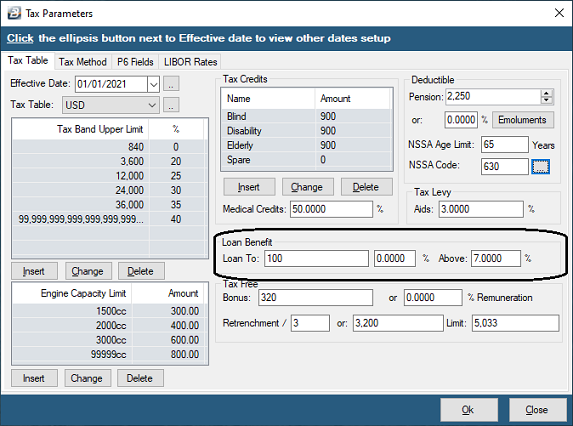
- Go to Setup → Tax → Existing
- Go to the Loan Benefit section on the right-hand side of the screen
- Enter the LIBOR rate plus the 5% ZIMRA loading
Once set up, if an employee's loan interest rate is lower than this loaded LIBOR rate, the deemed tax benefit is calculated automatically and included on the payslip whenever a Compute or Calculation Routine is run.
Vehicle Benefit
Vehicle benefit rates are set by engine capacity and are updated, along with other tax parameters, when the annual budget is announced — usually via a software update.
To set up Vehicle Benefit rates:
- Go to Setup → Tax → Existing
- Go to the Engine Capacity Limit section (bottom left of the screen)
- Use Insert to add a new engine capacity band, Change to alter one, or Delete to remove one
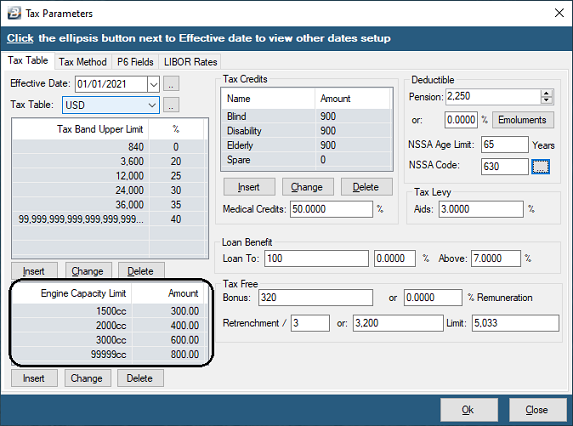
Example rates effective from 1 January 2021 (always confirm current rates before relying on these):
| Engine Capacity | Monthly Benefit |
|---|---|
| 0 – 1500cc | $300 |
| 1500cc – 2000cc | $400 |
| 2000cc – 3000cc | $600 |
| 3000cc+ | $800 |
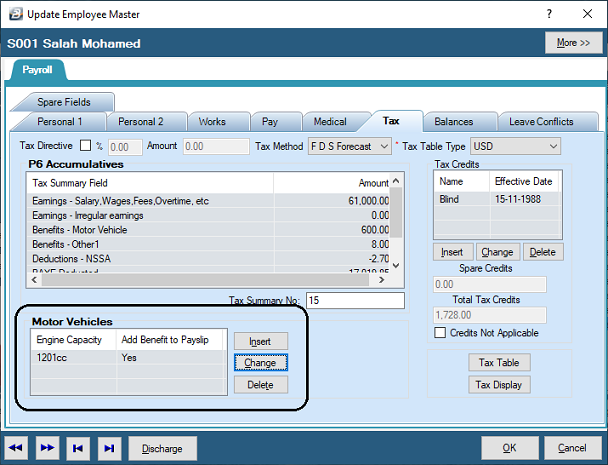
When allocating a vehicle to an employee, enter its actual engine capacity — Belina Payroll looks up the corresponding benefit amount automatically, and can be set to include the Motor Vehicle benefit total automatically during processing.
Housing Benefit
All remuneration received by an employee is taxable in the same manner as any other earning or allowance — this applies to housing too.
To process a housing benefit, create a transaction code under the Benefit category. Enter a fixed value if the benefit amount is set, or tick Manual Edit if the value varies by employee. The benefit is included on the payslip and in the PAYE calculation, but is not itself part of Net Pay.
Other Benefits
All other benefits received as a result of employment are taxable at their value to the employee. Process these using the Benefit - Other (Regular) category for benefits that recur regularly, or Benefit - Other (Irregular) for occasional ones.
Was this page helpful?