ITF16 & FDS Audit
The ITF16 is a report designed by ZIMRA that summarizes each employee's P6 details for the organization, used by ZIMRA to audit the tax calculation. Every registered employer must submit this return, detailing salaries, wages, allowances, benefits, and pension deductions for all employees.
FDS Audits and the ITF16 File
The ITF16 export is normally produced annually as part of the annual FDS Audit, and may also be requested for an interim audit. It's saved to electronic media and submitted to ZIMRA, normally within 30 days of the tax year ending.
ZIMRA imports the file into their own audit software, calculates what PAYE should have been deducted, and compares it with what was actually deducted. There should generally be no variance between Belina's figures and ZIMRA's.
The exported file has a .f16 extension. It can be:
- Saved to disk and hand-delivered to ZIMRA (in Harare: Kurima House, Nelson Mandela Avenue, between 3rd and 4th Street; elsewhere, check with your local ZIMRA office)
- Emailed as an attachment — confirm the correct address with your ZIMRA office or Liaison Officer, since these change over time
Whichever method you use, make sure the submission is acknowledged as received by ZIMRA.
Checks Before Exporting
- Go to View → Tax → ITF16
- Enter the organizational details on the ITF16 Report header form
- Print the report and check it lists the correct number of employees
- Check the P6 field setup for every transaction code
- Check the accumulated totals on the payslip summary against the printed ITF16, confirming each figure lands in the correct column
Exporting the ITF16 File
For local-currency payrolls, a tax split was implemented when the Zimbabwe Gold currency was introduced — you'll need to generate one export for January–March and another for April–December of that transition year (i.e 2024).
For payrolls originally in local currency (ZiG) that were later switched to Multicurrency, a tax split is needed for periods before and after the conversion. If the conversion happened after ZiG's introduction, three ITF16s are required: January–March, April to the last month processed in local currency, and from the Multicurrency implementation month through December.
If you converted an existing USD payroll to Multicurrency, no tax split is needed — both use USD tax bands.
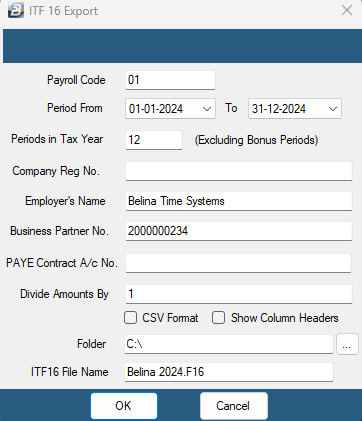
- Go to Utilities → Exports → Export ITF16
- Select the tax year under Period From — Belina automatically selects the correct number of periods
- Fill in your organizational details, including your company's TIN as the Business Partner number
- Select the destination for the export file
- Click OK
- Preview the Export Control Report, showing total PAYE for the tax year — this should tally with the sum of PAYE and Tax/Aids Levy for the same period
- Follow the prompts until the ITF16 is saved
Contact your ZIMRA Liaison Officer for instructions on submitting the completed ITF16.
Printing P6's
Once ZIMRA has audited the ITF16 and any necessary adjustments have been made, P6's can be printed. See P6 Certificates for the full process.
Was this page helpful?