Leave Reports
Belina Payroll provides a full set of leave reports, accessed mainly from View, then Leave. Each report focuses on a different aspect of leave: balances, transactions taken, value, or comparisons between periods.
For each report:
- Go to the menu path shown below
- Enter any selection criteria required (date range, employee filters, etc.)
- Click OK
- Preview or print
Leave Reports
| Report | Menu Path | What It Shows |
|---|---|---|
| Detail | View > Leave > Detail | Leave transactions, balances, and accumulatives. |
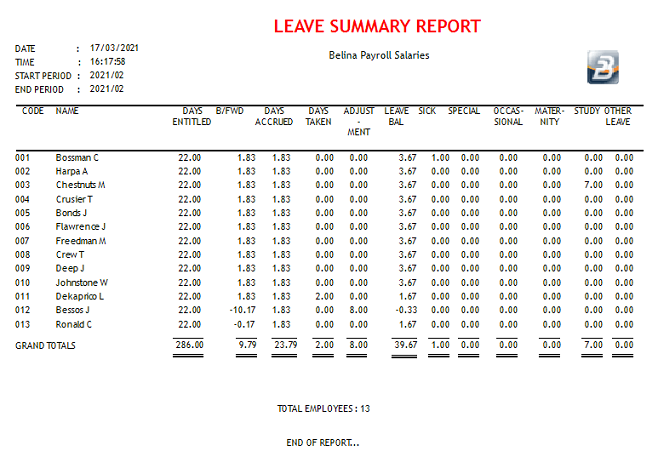
| Summary | View > Leave > Summary | Summary of leave balances and days taken per employee, for the period range selected. |
| Valuation | View > Leave > Valuation | Days and value of the leave balance, plus days and cost of other leave types taken, per employee. |
| Provision | View > Leave > Provision | Value of leave days per employee at the end of the specified period. |
| Valuation 3 Months - Detail | View > Leave > Valuation 3 Months > Detail | Value of leave day balances per employee, for 3 periods from the date selected. |
| Valuation 3 Months - Summary | View > Leave > Valuation 3 Months > Summary | Total value of leave day balances for 3 periods from the date selected. |
| Valuation Variance - Detail | View > Leave > Valuation Variance > Detail | Compares the leave day balance and its value, per employee, from one period to another. |
| Valuation Variance - Summary | View > Leave > Valuation Variance > Summary | Compares the total value of the leave day balance from one period to another. |
| On Leave | View > Leave > On Leave | Employees on leave during a specified date range. |
| Schedule | View > Leave > Schedule | Leave applications made by employees during the period range selected. |
| Leave Planner | View > Leave > Leave Planner | Leave days processed for a 60-day window from the start of the current period, colour-coded by leave type. |
| Sick Leave | View > Leave > Sick Leave | Number of times an employee has taken sick leave, the number of days, and the value of that leave. |
| Special Leave | View > Leave > Special Leave | Details of special leave taken during the period, together with the balance remaining per employee. |
| Study Leave | View > Leave > Study Leave | Study leave days taken and their value, per employee, for the period selected. |
| Leave Bank Detail | View > Leave > Leave Bank Detail | Individual leave bank movements per employee: opening balance, leave banked, leave taken, dates, and calculated closing balance. |
| Leave Bank Summary | View > Leave > Leave Bank Summary | Total leave bank movements per employee: opening balance, leave banked, leave taken, and closing balance. |
| Leave Bank Valuation | View > Leave > Leave Bank Valuation | Value of the leave bank balance and days taken. |
| Leave Import Report | Generated automatically after Utilities > Imports > Leave Records | Leave records imported per employee, showing leave type and number of days. See Importing Leave Records for the full import process this report supports. |
Choosing a Report
If you're not sure which report best fits a requirement, start with Detail or Summary for a general view of balances and transactions, Valuation or Provision when the cost/value of leave is needed (e.g. for accruals or audit purposes), and the Valuation Variance reports when comparing leave liability across two periods.
Was this page helpful?