Calendar and Public Holidays
Setting up public and other holidays is done through the Calendar option. The calendar setup affects several modules:
- Time Control Module — uses the calendar to apply the correct rate of pay when an employee works on a normal weekday that is also a holiday.
- Payroll Module — uses the calendar when calculating leave days taken. If leave is based on working days, holidays are not counted as leave. If leave is based on calendar days, holidays falling within the leave period are counted.
- Belina Connect Module — has the option to use the same calendar setup in its own leave day calculations.
When leave is processed, the number of days and start date are entered, and Belina Payroll automatically computes the end date. Holidays falling within the leave date range are not counted as leave days.
Setting Up Calendar Holidays
- Go to the 'Setup' and then 'Calendar' menu options
- Select the year in the dropdown menu
- To add all the 'Common Public Holidays' for a particular year click Insert
- Select 'Common Public Holidays', immediately the table will be populated
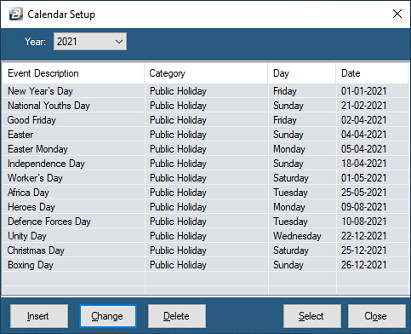
To add any other holiday press 'Insert' and select 'New'
In the example below, the 'American Independence' Holiday of 4 July would not normally be a public holiday in Zimbabwe but it may be setup as a holiday if the organization wants to include this day as a holiday. In the same manner there may be religious days that may also rank as holidays in the calendar even though the Zimbabwe calendar does not officially recognize them.
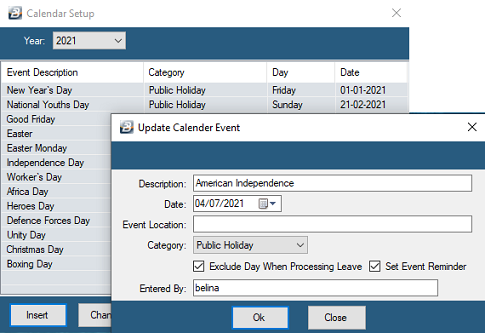
Field Reference
| Description | Enter the Holiday/ Event name |
|---|---|
| Date | Enter the date on which the Holiday/ Event is held |
| Event Location | This could be the location of the event. For example the organization is holding a teambuilding or training day at a particular venue. This information could come through on a reminder. |
| Category | Use the dropdown menu to select the category of the event to be held on this day. The 'Birthday', 'Phone Call' and 'Meeting' categories are particularly useful in the 'Reminder' system where these categories are used. |
| Exclude Day When Processing Leave | This is useful when the 'Public Holiday' category has been selected and is being used when leave is calculated according to working days taken. Holidays are not included in the leave day calculation. |
| Set Event Reminder | To be reminded of the event tick this option. A pop-up reminder will appear on the screen on the reminder day. |
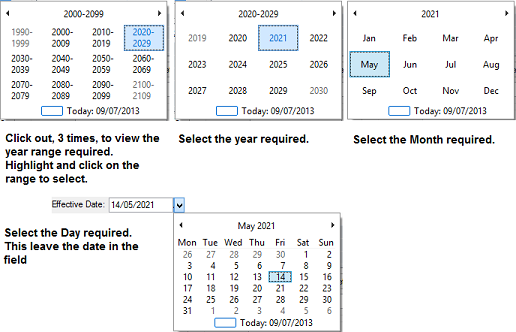
Whenever there is a date entry field there is a dropdown menu that will enable you to select the date required, rather than having to type in the date manually.
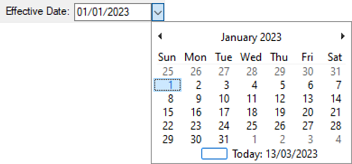
It is possible to zoom out from the current date by positioning and clicking the mouse over the top date field.
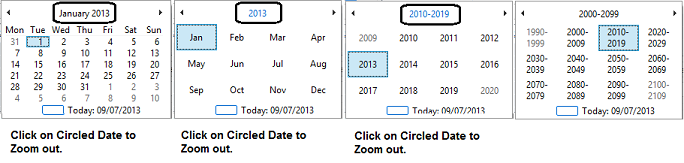
To select a date, e.g. 14 May 2021 in the future, Click again, as many times as necessary to zoom out to the required date. It is then possible to select the year, month and day
Was this page helpful?