Restore
The backup facility in Belina Payroll captures both current and historic data for the open payroll. Restoring data reverts the affected payroll back to its precise state at the time the backup was created.
When to Restore
You may need to restore data onto the system in specific scenarios:
- Data Corruption: Current payroll data has become corrupted, and restoring from a clean prior point resolves the issue.
- Processing Errors: Significant errors were made during transaction processing, requiring a rollback to a pre-error state.
- Moving Data: Processing needs to be transitioned to another computer. Install the payroll software on the new machine and restore the data to resume processing.
Pre-Restore Precautions
- Pre-Restore Backup: Always take a fresh backup of the current system state before attempting a restoration, serving as a safeguard against accidental data loss.
- Network Check: Ensure no other users are logged into the system through the network.
- Process Interruption: If the restore process is interrupted for any reason, repeat the entire procedure from the beginning to prevent a mixture of old and new files on the system.
Restoring a Backup
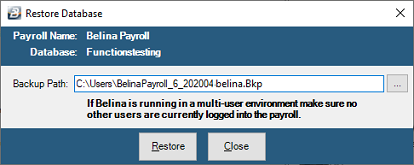
- Go to File > Restore.
- Click the Ellipsis (...) button to browse and select the specific backup file you wish to restore.
- Press OK to continue and initiate the restoration process.
- Once complete, reload Belina Payroll. The routine takes the user outside the software during execution, so you will need to log back into the system.
Best Practices
- Maintain a history of backups going back several periods on reliable storage media.
- Keep a secondary copy of backups on off-site storage media.
- Use durable media that will not be overwritten prematurely.
Was this page helpful?