Bonus Period
An annual bonus is a bonus paid to employees at the end of the tax year. The calculation of tax on the bonus takes into account the tax-free bonus amount, which is generally announced at the end of the tax year as part of the Minister of Finance's budget speech and gazetted some time after.
The bonus amount is not projected in the FDS tax calculation but is simply added to the total when calculating Taxable Income. Tax on the bonus amount is calculated at the top marginal tax rate — the percentage applied to the last dollar of income before the bonus tax is calculated.
Incentive, production, and other bonuses paid to employees during the course of the year should not be processed as 'Annual' bonuses. This income is taxed like any other earning, as either a Regular or Irregular income.
Any PAYE payable on the bonus is included in the employee's total PAYE amount for the period. This can be checked via the Tax Display for the employee.
Bonus Period
A Bonus Period is a period created specifically to process a bonus amount. This is done before period end — you cannot convert the current period into a bonus period. The bonus period must exist before doing a period end into it.
Note that period numbers will change once a bonus period is inserted. For example, with 12 periods in the year, processing a bonus after November means the Bonus period becomes period 12, and the December period becomes period 13. This does not change or affect the tax calculation for that period — the bonus period exists purely so the bonus has its own separate payslip.
To insert a bonus period
- Insert a new period into the Period Table (List of Periods). This must be done in a period prior to the bonus period.
- Go to Setup, Periods, then Pay Periods
- Highlight the period before which you want to pay the bonus
- Click Insert
- Tick Bonus Period
- Enter the Start and End dates. For a bonus period, use the same specific date for both Start and End within the month the bonus is being processed — e.g. a Christmas Bonus paid in Period 12 (before December) would use Start Date 29/11/2022 and End Date 29/11/2022.
- Go to Accounting Periods, click the dropdown arrow, and select the accounting period the bonus is being paid in.
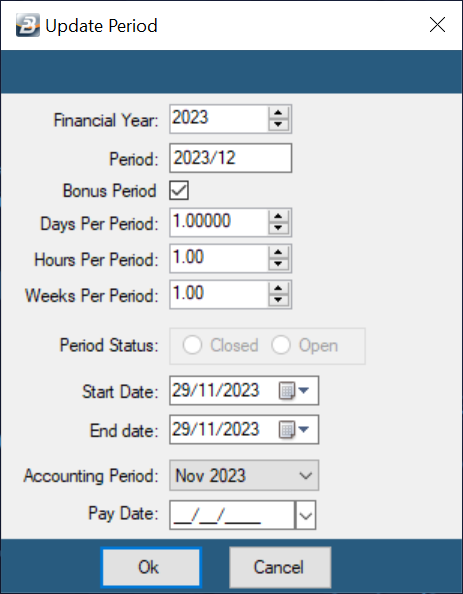
- Click OK
The system will confirm that the next period is a bonus period when you run Period End.
Bonus Transaction Code
Create a Bonus Transaction Code (Transaction Code Category: Earnings - Bonus) for processing.
Processing a Bonus
To process the Bonus Transaction using Payslip Input:
- Go to the Process > Payslip Input
- Select the employee from the table of listed employees
- Press Insert
- Look up and select the Bonus Transaction Code
- Enter the amount of the Bonus
- Press OK
The Bonus is automatically added to the Earnings and Deductions for the employee.
- Leave days are not accumulated in a bonus period.
- Amounts processed are not projected in the FDS system, so care should be taken if recurring amounts are being processed.
- Recurring transactions from the previous normal period will not come through in the bonus period, but will come through in the next normal period.
- Using a separate bonus period ensures the payslip shows only the Bonus and related tax.
Bonus - Tax Concessions
-
Annual Bonuses qualify for tax exemption up to the amount specified by the Minister of Finance each year. Annual bonuses subject to tax relief should be set up using the 'Earnings - Bonus' Transaction Code Category.
-
The tax-free element is set up in the tax parameters. The value of any bonus amount(s) paid to employees is tax-free up to the value entered there — excess amounts are taxed.
-
Other bonuses: Incentive and other bonuses should be set up using either 'Allowance - Normal (Regular)' or 'Allowance - Normal (Irregular)' Transaction Codes, depending on the regularity of the payment. This ensures correct projection of income for FDS tax.
-
Threshold changes: If the Bonus Tax-Free Threshold changes within a tax year, the FDS tax system automatically adjusts the current tax deduction to account for it. Any bonus amounts taxed in previous periods that should not have been taxed under the new threshold receive tax relief in the current period. If bonus amounts paid to date did not exceed the threshold, no adjustment is made.
The tax deducted on the bonus is explained in the Tax Display report — the bonus tax-free amount not already utilised is deducted from the bonus amount first, with the balance taxed at normal rates.
Was this page helpful?