Users
Belina Payroll is designed to ensure that authorized personnel have access to authorized areas. Setup the different people that are to have access to Belina Payroll as Users. These are the combined list of System Users that may have access to one, or more payrolls in the system.
Setting up Users
View written instructions
User Details
- Go to Setup - Security - Users.
- Click Insert to add a new User, or Change to amend existing details.
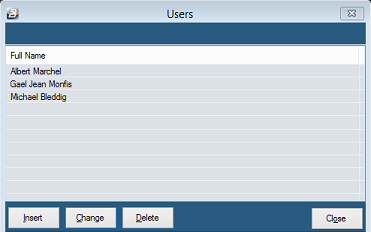
Notice there are 3 Tabs where security parameters are loaded for the User.
Password Tab
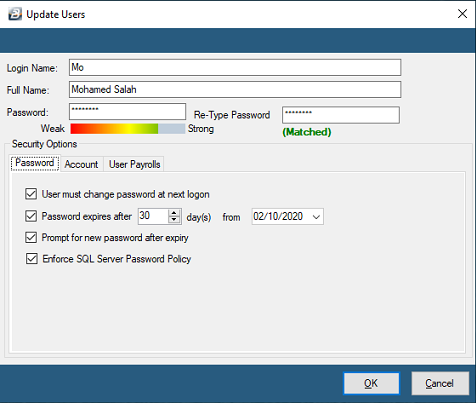
| Login Name | Enter a short name to identify the User |
|---|---|
| Full Name | The full name of the User |
| Password | Where there is network access, or third party access to the payroll computer, select the 'Enforce SQL Server Password Policy' option, below. This enforces the entry of strong password controls. These would include passwords of a minimum of 8 characters that combine upper and lower case alphabetic, numeric and other symbols.Where there is no network access and no third parties have access to the payroll computer, then a less severe password policy may be used and the 'Enforce SQL Server Password Policy' option de-selected. |
| User must change password at next logon | The Administrator has the ability to enforce a change in password for a particular User. |
| Password expires every | The Administrator can stipulate how long passwords are valid for. |
| Prompt for new password after expiry | If the password has already expired for a User then the User has the ability to change the old password to a new one before logging into the system. |
| Enforce SQL Server Password Policy | This option enforces the entry of more secure passwords, along the lines of those recommended by Microsoft. These passwords include the use of passwords with a minimum of 8 characters that combine upper and lower case alphabetic, numeric and other symbols. |
Account Tab
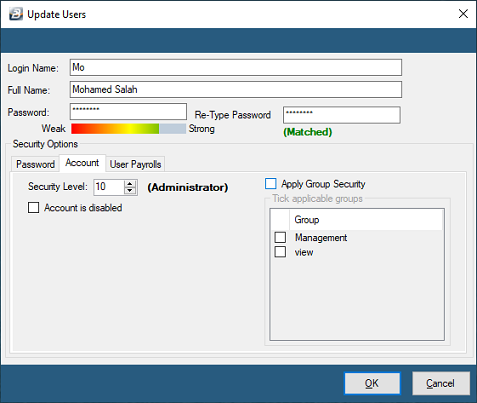
Each user is allocated a Security Level in the range 1 to 10 with Level 1 being the lowest level and 10 the highest. If the User is to be allocated to a group then place a tick under Apply Group Security and tick the group(s) applicable to the user.
Account is disabled is ticked if a user should no longer be able to login to Belina.
User Payrolls Tab
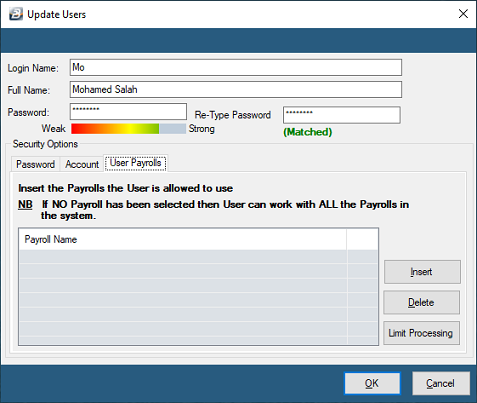
If the User is to be given full access to all payrolls in the system then no entries need to be made in this Tab. Otherwise insert the payrolls to which the User has access.
The 'Limit Processing' button allows the limitation of access for the User to particular Department, Cost Centres, Paypoints and Employee Master Fields.
Was this page helpful?