Security Areas
Once the Users have been setup and the security levels attached to the User we now focus our attention of what security levels are attached to:
- Transaction Codes
- Menus, and
- Employee Master Fields
Setting up Security Areas
View written instructions
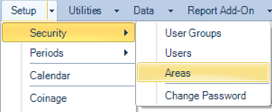
To access the 'Areas' menu option go to the Setup - Security - Areas menu options.
The following screen displays showing the Payrolls and the Security Level of access required to access each of these payrolls:
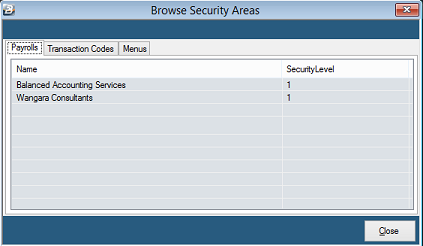
Notice that there are three Tabs on the table:
Payrolls Tab
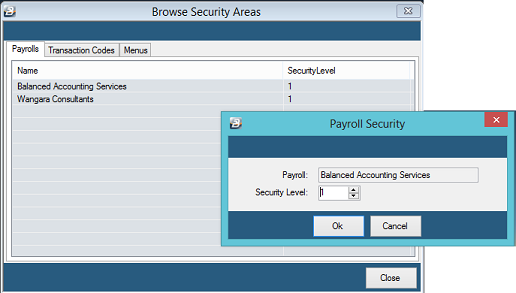
Default Security levels of 1 are given to each payroll and area in the system. This allows any initial User to have access to the system without restriction. To change the Security Level for a payroll highlight the payroll, double-click or press 'Change'. The following screen displays:
Transactions Codes Tab
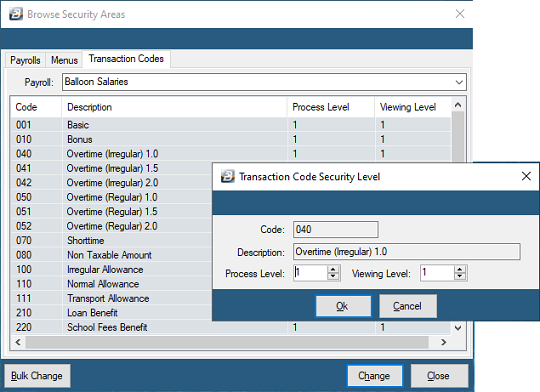
Default Security levels of 0 are given to each Transaction Code in the Payroll Module. To allow access to the Transaction Data, change the Security Level for each Transaction Code. Highlight the Transaction Code, double-click or press 'Change'. The following screen displays:
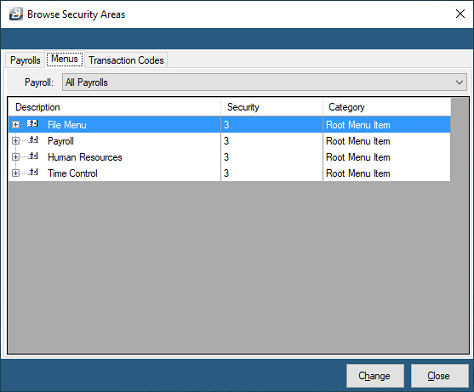
Menus Tab
Default Security levels of 3 are given to each of the menu options in the Payroll Module. To change the Security Level for each Menu Option expand the menu tree with the '+' button, highlight, or double-click, the Menu Option required and press 'Change'. The following screen displays:
Was this page helpful?