Employee Suspension
An employee is suspended when they do not work for a specified period. You have the option to suspend the person with or without transactions being processed on their payslip during the period of the suspension. (Note: Marking an employee 'Absent' works in the exact same manner as if the employee is 'Suspended').
How to Suspend an Employee (Without Pay)
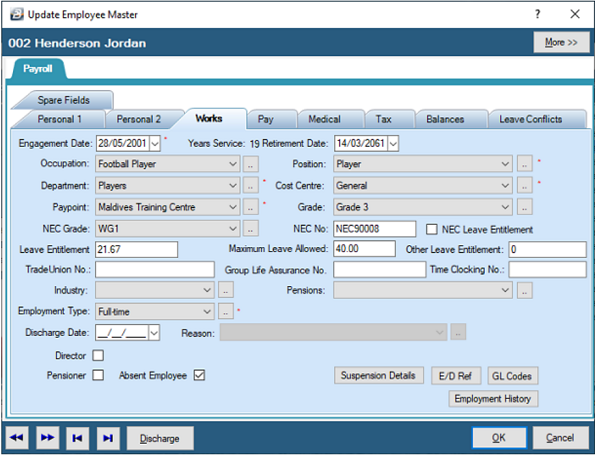
To mark an employee as 'Absent' or suspended so that no payroll processing occurs:
- Go to the 'Edit', then 'Employee Master' menu options.
- Select the relevant employee from the table.
- Select the 'Works' tab.
- Place a tick against 'Absent Employee'.
- Note: This will automatically remove transactions in the Payslip Input, and no processing will be done for that employee. When the employee returns to work, removing the tick will put the transactions back onto the Payslip Input.
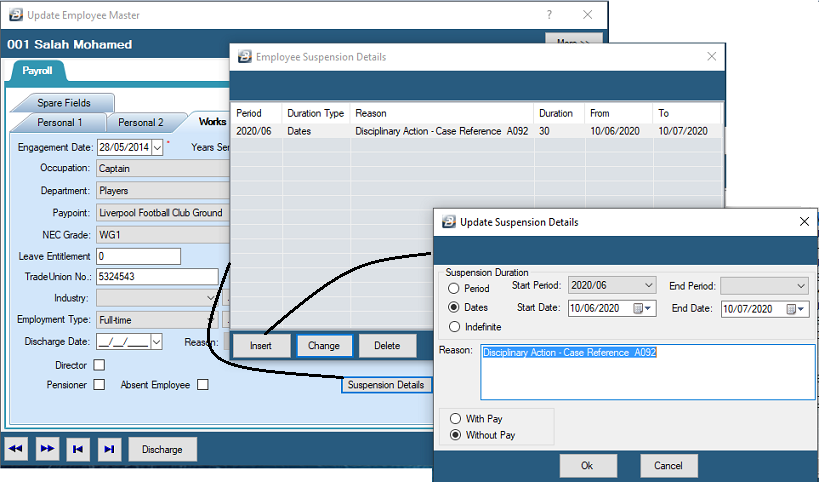
Suspension Details
By clicking the 'Suspension Details' button on the Works tab, you can log specific administrative details regarding the absence:
- Enter the exact start and end dates/periods of the suspension.
- Indicate whether the suspension is 'indefinite'.
- Enter a specific 'Reason' to explain the suspension for your audit trail.
Suspension With Full Pay
In some cases, it may be decided to suspend the employee with full pay so that their standard transactions will not need to be re-captured when the suspension is lifted. If you want to process the transactions but do not want the actual funds to be released while the suspension is active, you can simply suspend payments to the employee's bank account (managed via the Pay tab).
Tax Implications
- Method Change: If the employee misses a pay period, upon their return to work, their tax must not be calculated using the FDS method. They must be switched to the standard Non-FDS method on their Tax tab.
- Pay Adjustments: Any pay adjustments that need to be processed in the new period to account for amounts due should be processed using an 'Earnings - Amount' (irregular income) transaction code.
Was this page helpful?