NSSA Adjustments
If you have made adjustments to NSSA using a separate NSSA adjustment transaction code, this code can be included on the NSSA report. As long as the adjustment code is set up under the category Deduction - Pension, it's a simple matter of adding it to the report setup.
Step-by-Step Setup
- Open the NSSA report: View → Third Parties → Pension → NSSA
- Click the Setup button
- Click Insert
- From the Transaction Code drop-down, select the NSSA adjustment transaction code
- Set the radio button to NSSA as the Type
- Click OK to confirm
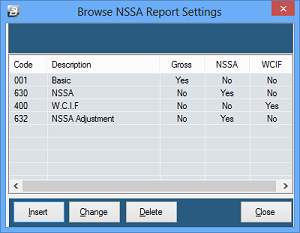
The setup screen will now list your adjustment code alongside the other NSSA-related transaction codes.
Proceed to print the report — it will now include the value of the adjustment.
Was this page helpful?